How to Generate Insurmountable Passwords
Passwords still sit at the center of most account security. That makes the real goal simple: every important account should get a long, unique password that you do not have to memorize, plus multi-factor authentication wherever it is available. The easiest way to do that is to let a password manager generate and store the password for you, then keep one strong passphrase in your own memory for the manager itself.
If you want a quick generator for a strong phrase or random password, mdigi.tools/passwordgen/ is a useful place to start.
What is an insurmountable password?
An insurmountable password is not just a password that looks complicated. It is a password that is hard to guess, hard to reuse, and hard to steal at scale.
In practice, that means three things:
- It is long enough to resist online guessing.
- It is unique to one account, so one breach does not unlock everything else.
- It is generated or stored in a way that avoids predictable human patterns.
For a password you need to remember, the best shape is usually a passphrase: several unrelated words joined into one string. For everything else, a password manager should create the secret and keep it for you.
The problem password reuse creates
People do not usually lose accounts because a password was too short by one character. They lose them because the same password was reused across many sites, because a phishing page captured it, or because a breached site stored it badly.
That is why old advice about splitting passwords into “important” and “unimportant” groups is outdated. A forum account can still become the first step into your email, and email is often the recovery path for banks, stores, and social accounts.
If one password is reused anywhere, the blast radius grows quickly.
How it works
The modern model is layered. The user side, the browser, and the server each have a job.
flowchart LR
  A[User] --> B[Password manager]
  B --> C[Unique password for one account]
  C --> D[Login form]
  D --> E[Server checks rate limits]
  E --> F[Password hash verification]
  F --> G[MFA challenge]
  G --> H[Session token]
The flow looks like this:
- A password manager generates a random password for a new account.
- The browser autofills it, so the user does not need to type it repeatedly.
- The server receives the password over TLS and compares it against a salted, slow hash.
- The site rate-limits repeated failures so online guessing becomes expensive.
- MFA adds a second check, which protects against stolen passwords and many phishing attempts.
That is the important architectural idea: the password is only one layer. The storage system, the login policy, and the second factor matter just as much.
Core building blocks
Here is the modern comparison in plain language.
| Strategy | Old habit | Modern practice | Why it matters |
|---|---|---|---|
| Password creation | Pick something you can remember for every site | Let a manager generate a unique password, or use one long passphrase for the manager | Reuse is what turns one breach into many |
| Password length | Shorter strings with mixed symbols | Long passwords and passphrases are better than symbol tricks | Length is easier to scale than complexity games |
| Password rules | Force uppercase, numbers, and special characters | Avoid arbitrary composition rules | Users predictably choose weaker patterns when forced |
| Password storage | Plain text or fast hashing | Salted, slow hashing such as Argon2id or PBKDF2 | Slows offline cracking after a database leak |
| Account protection | Password only | Password plus MFA | A stolen password is no longer enough |
The important distinction is between a password that a person must remember and a password that a machine should generate. Most users should only memorize one secret: the master password for the manager.
Where the screenshot fits
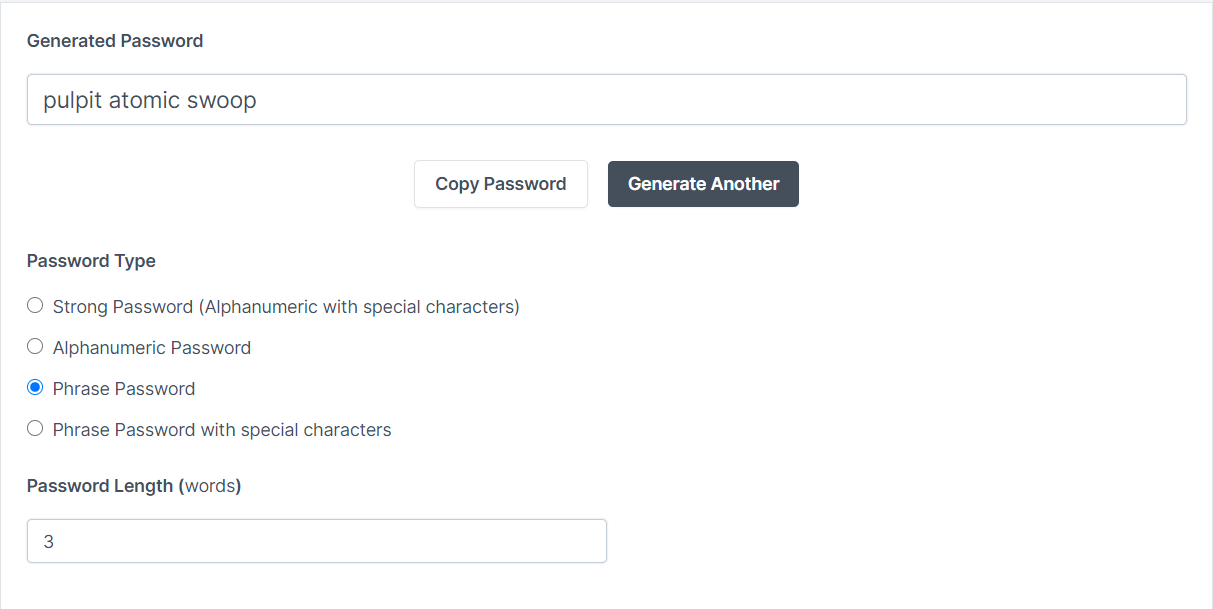 This example shows the kind of passphrase or random password a generator can produce when you need one strong secret to remember.
Real-world use cases
For normal users, the best use case is simple: use a password manager for email, banking, shopping, social media, and work tools. Generate a unique password every time, then turn on MFA for the accounts that support it.
For site owners, the use case is different. You need to make account takeover expensive even if your database leaks. That means slow password hashing, proper salting, throttling, and support for long passwords and password managers.
For teams, the right pattern is to treat passwords as one part of a larger access system. A good login flow combines good client-side behavior, strong server-side storage, and recovery options that do not weaken the primary factor.
Practical considerations
If you are generating a password for yourself, aim for one of these two patterns:
- A random password generated by a password manager for every account.
- A long passphrase that you only memorize once, usually for the manager itself.
If you want a quick random password from the command line, this works well:
openssl rand -base64 24If you are building the login system, store passwords with a slow hash rather than encryption:
import argon2 from 'argon2';

export async function hashPassword(password: string) {
  return argon2.hash(password, {
    type: argon2.argon2id,
    memoryCost: 19456,
    timeCost: 2,
    parallelism: 1,
  });
}
That storage layer matters because a leaked database is one of the most common ways passwords get exposed. A good hash makes stolen data much less useful.
The other practical rule is to keep MFA enabled on accounts that support it, especially email and finance. If someone learns your password but cannot complete the second factor, the account is still protected.
Common misconceptions
- “A complicated-looking password is automatically strong.” Not if it is short, reused, or predictable.
- “My forum login does not matter.” It can still become the path into your email or password resets.
- “Password managers are a risky add-on.” They are the main way most people can actually maintain unique passwords at scale.
- “Changing passwords often is the main defense.” A long, unique password plus MFA is usually more effective than arbitrary password rotation.
- “Hashing and encryption are the same thing.” They are not. Passwords should be hashed with a slow password hash, not encrypted for later recovery.
Related articles
If you want to go deeper, these posts connect well with this one:
- Password Management: Password Managers To Handle Your Accounts
- How Malware Steals Passwords From Your Browser
- How to Get Most Out Of Your Password Manager?
- Protect Your Laptop

